TL;DR - Try the app here: https://defence.tobyreid.co.uk. If the app is slow on first load, it’s because hosting is FREE!
Back in Dec/Jan 2020 I built the first version of Defence of Britain: a hobby app that read the publicly available Pillbox Study Group KMZ and put it on a map. It worked, but I was never truly happy with it - and at the time I didn’t know of any other hobby projects doing the same thing.
Fast‑forward a few years: other people created similar (and better) applications, and my original project quietly gathered dust. Here’s an excellent one from Matt Aldred.
With the recent rise of agentic AI tooling (Claude Code, Cursor, GitHub Copilot), it felt like the right moment to revisit the idea - not just to fix what bothered me about the old version, but to see what it looks like to build with an agentic assistant while using my own experience to avoid dead‑ends.
I started from a single SFC (Single File Component) in an otherwise blank GitHub repo. This is the story of building the app again.
Crucially, given my day job and how time‑poor I am, I had to keep this tightly timeboxed into a small number of focused sessions over the holiday period. That constraint ended up shaping the implementation style: fewer big rewrites, more “get one thing working end‑to‑end, then refine”.
What were the goals?
The first goal was simple: make it easy to explore UK WWII defence locations on an interactive map, make locations shareable, and make it feel like an app.
The second goal was to keep it cheap. I didn’t want to pay for expensive hosting, or incur charges for containers sitting idle in the background.
The third and final goal was to deliberately work with agentic AI (GitHub Copilot) rather than against it - letting it move fast on implementation, while using my own experience to spot wrong turns early and swerve away from dead‑ends.
Context matters
One thing that made GitHub Copilot genuinely useful (rather than just fast) was giving it the right context up front.
Instead of treating the frontend, backend, and infrastructure as separate worlds, I created a single VS Code workspace that included:
- the frontend repo
- the backend repo
- the Terraform repo
Then I added two kinds of “guidance” that an agent can actually use:
- GitHub Copilot instruction files to set expectations and guardrails (what good looks like, what to avoid, how we structure code)
- extensive
README.mdfiles that explain intent - constraints, non-goals, how to run things locally, and why the architecture looks the way it does
That meant Copilot spent less time guessing and more time executing - and when it suggested something questionable, it was usually obvious why it didn’t fit the stated intent.
The other practical reality is token length: Copilot only has a finite context window, and it’s surprisingly easy to blow it by pasting logs, huge files, or repeating the same background in every prompt. Being deliberate about context helped - keeping instruction files short, keeping READMEs focused on intent (not walls of prose), and asking the agent to summarize before moving on so the “working set” stayed relevant.
Beyond ad hoc prompting: making Copilot stateful in-repo
Over time, I moved beyond one-off prompts and formalised how AI is used inside active repositories.
In each core repo, I now maintain structured Copilot Instructions that define:
- the purpose of the repository
- architecture and key entry points
- guardrails (for example: do not break API contracts, always return responses)
- the target product end-state
- API structure and domain-modelling expectations
- build, test coverage, and security constraints
- any lint / coding style / standards
The practical effect is simple: Copilot gets persistent architectural context before it writes or modifies code.
In addition, I have also directed Copilot to keep an append-only Copilot conversation log in each repo. Whenever meaningful AI-assisted changes are made, I ensure the AI captures:
- the driving prompt (paraphrased)
- what changed (files/areas)
- key decisions and assumptions
- open follow-ups
That gives continuity across sessions and forces later prompts to account for prior decisions, instead of treating each chat as a fresh start.
In effect, this turns AI from a stateless assistant into a context-aware collaborator embedded inside the repository. I’m starting to see more people talk about this as the next real advantage in extracting maximum yield from agentic tooling, and I’m pleased I put that in place early.
The Copilot development feedback loop (practically)
Once the repos, guidance, and logs were in place, the main thing that made Copilot feel “agentic” was the feedback loop: give it exactly the right slice of context, ask for a concrete change, let it execute, then review and iterate.
In practice, the most reliable ways I found to steer it were:
- Add specific files to the conversation context. If you’re asking about a particular behaviour, include the relevant files rather than describing them. In VS Code that often means opening the file(s) and attaching them to the chat, or explicitly referencing them in the prompt (e.g. “update
useSelection.tsandMapPage.vueto…”). - Highlight the exact lines you care about. If there’s a bug in a handler or a weird edge case in a composable, selecting the relevant block and asking “fix this” (or “refactor this”) produces much better results than asking at a distance.
- Constrain the task to an executable unit of work. I had the best results when the request was something like: “add a new endpoint”, “make this state deep-linkable”, or “change the proxy to buffer upstream responses” - rather than a broad “improve the architecture”.
With Copilot in Agent mode, the loop gets tighter again because it can do the mechanical steps for you:
- open and inspect files across the workspace
- search for usage and refactor consistently
- run commands (tests, builds, linters) to validate changes
- apply edits directly, then show diffs for review
That doesn’t remove the need for judgment - it just moves your time from typing to reviewing. The trick is to treat the agent like a fast junior engineer: be very specific about what “done” looks like, and keep the working set small enough that you can meaningfully review what it changed.
One more practical workflow detail: I enabled auto-approval for certain non-destructive actions (things like read-only file inspection/search, or other operations that don’t modify code). It helps maintain flow, but it comes with an obvious trade-off: if the agent is allowed to execute tools automatically, you should stay alert.
This matters even more if you connect the agent to external tooling via MCP servers (Model Context Protocol). MCP is powerful, but it effectively extends the agent’s reach. Only connect to MCP servers you trust, understand what capabilities they expose, and be cautious about granting broad permissions - especially anything that can write files, run shell commands, or access secrets.
That “cheap + timeboxed” combination influenced the shape of the architecture: a static-ish frontend with serverless endpoints is perfect for hobby projects where you want to pay little (or nothing) when nobody’s using it.
One concrete decision fell out of that cost constraint: I originally started with Google Maps, but I swapped it out for Leaflet + OpenStreetMap tiles to keep running costs predictable (and close to zero). The trade-off is that you lose some of the nice-to-have polish like custom map colours.
The finished system is split into two parts:
- UI: Nuxt 4 + Vue 3 + TypeScript + Vuetify, rendering a Leaflet map with OpenStreetMap tiles and a details drawer.
- API: Azure Functions (isolated worker, .NET 8) that reads a KMZ dataset, clusters points for map performance, and serves embedded icon/assets.
From the start, I wanted the UI to feel like a native map app: fast pan/zoom, meaningful clusters, reliable selection, deep links, and mobile-friendly controls.
One more constraint that mattered for this dataset: some POI details come through as HTML. That’s useful for formatting, but it meant the UI needed to treat the content as hostile, and sanitize before rendering.
Shipping it: CI/CD and infrastructure
Even though most of the work described here is product-facing, getting it reliably deployed was part of the project from the start.
GitHub Actions deployment
The application is deployed via GitHub Actions. The workflow builds the UI and publishes it to the hosting platform (Azure Static Web Apps), and deploys the API to Azure Functions.
The main value of having this automated was speed and safety: I could make changes in small timeboxed bursts and still have confidence that a clean build and deployment was only a push away.
Infrastructure as code (Terraform)
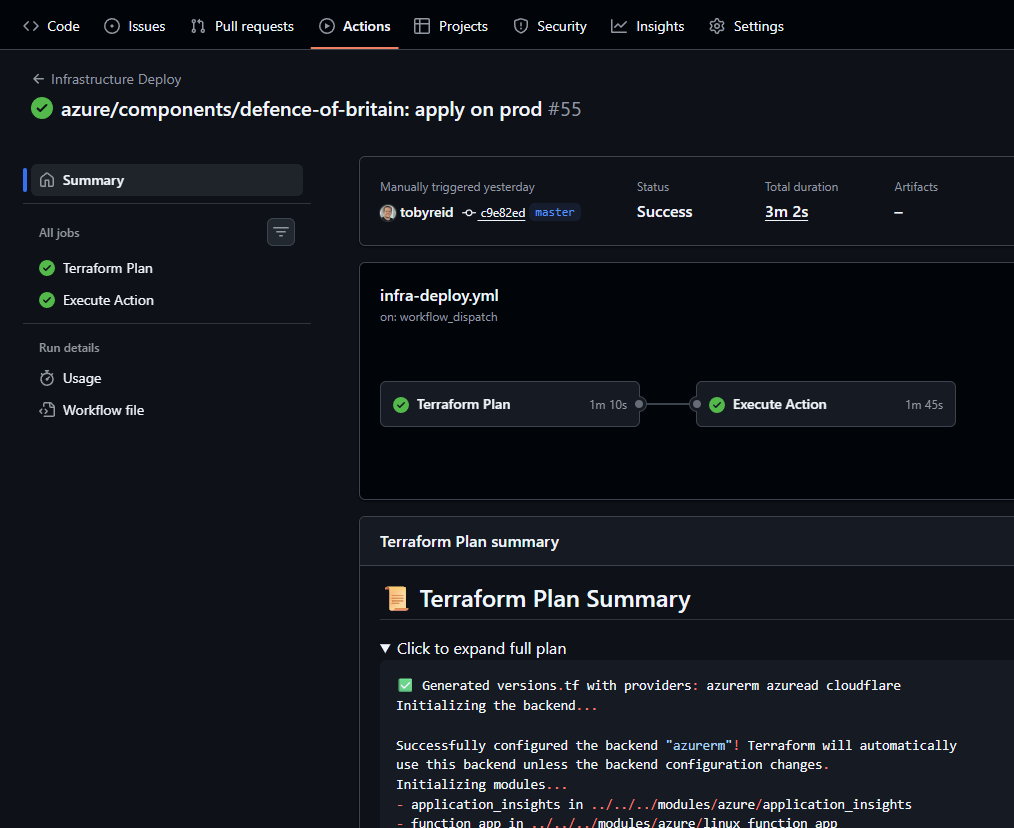
Separately (in another repository), I keep the infrastructure definition in Terraform and deploy it via its own pipeline. That pipeline provisions and updates the Azure resources the app needs (and keeps the “cheap to run” goal honest).
That infra repo also contains secrets, but not in plaintext: I use git-crypt so encrypted .tfvars can live alongside the Terraform code. I wrote up the approach in this post.
Splitting “app deploy” and “infra deploy” kept responsibilities clear:
- the app pipeline ships code
- the infra pipeline manages the underlying Azure resources
I’m particularly happy with the way this turned out:
Phase 1: get the map working, then make it usable
The first commits were classic “get to something you can see” work:
- Nuxt/Vuetify scaffold, the initial map page, and early CI wiring.
- A quick return to “basic map working again” - the app could render a Leaflet map (OpenStreetMap tiles) and place markers.
Once the map existed, UX improvements landed rapidly:
- A layout shell and the first navigation drawer.
- A details side drawer so tapping a marker immediately gave context.
- Early performance tightening (including a deliberate O(n²) → O(n) improvement when dealing with marker lists). This was a real game changer over the original application and led to far less janky behaviour.
- Cluster behaviour: dense areas became clusters, and clicking a cluster zoomed in rather than opening a meaningless “cluster details” view.
The “native-ish” feel started immediately too:
- Locate / Follow modes (one-shot location vs tracking/centering while moving).
- Heading/compass work, including early fixes for noisy orientation.
- A global loading indicator so data fetches weren’t mysterious.
On the backend, the API repo started with the Azure Functions isolated worker host plus the core services:
- Parsing the KMZ dataset.
- Clustering markers to keep the map fast.
- Serving icons/assets out of the KMZ so markers could use the correct imagery.
Phase 2: turning a map into a product: structure and deep links
Once the basics worked, the next wave was about stability and predictability.
I made selection and navigation feel consistent:
- Marker selection opened the details drawer.
- Selection became deep-linkable (URLs could represent “what you’re looking at”).
- The drawer behaviour was refined (closing rules, widths, and small SSR quirks).
This was also the moment where the codebase needed to stay maintainable.
Instead of letting the main page grow into a mega-component, I did a major refactor: move behaviour into composables. Each “area of concern” became its own composable:
- Loading locations for the viewport
- Selection state + URL sync
- Marker click behaviour
- Map event wiring (bounds changes, debouncing, drag interactions)
- User tracking + follow logic
That refactor made subsequent features much easier to add without fear.
Once selection was stable and URL-addressable, a few high-value “product” features became obvious:
- making locations shareable (so you can send someone a link and it opens the same place)
- adding “open in Google Maps” actions
- ensuring the details drawer didn’t fight you when you pan/zoom around
The About page landed around here too, establishing:
- attribution
- data credit
- disclaimer
Under the hood, I treated composables as the seam between “map SDK world” and “Vue world”. That made it much easier to reason about problems like: “what closes the drawer?”, “what disables Follow?”, and “what state belongs in the URL?”.
Phase 3: search and “map feel” polish
With map browsing and selection stable, the focus shifted to finding places and making the map feel good under your fingers.
On the UI side:
- POI search work expanded significantly.
- Gesture and interaction polish landed: improved drag behaviour, handling fast “fling” interactions, and smoothing jank.
- Selection UX improved again: pin history, and allowing deliberate de-selection.
On the API side, search became a first-class feature:
- A POI search endpoint was added.
- Search quality improved with term splitting.
- The dataset was updated and a summary endpoint was introduced so the UI could show “how many places are in this build” (and which KMZ it’s based on).
To support those UX flows, the API surface became clearer:
- A bounding-box endpoint for the map
- A lightweight search endpoint for autocomplete
- A details endpoint for a single place
- A safe way to serve embedded KMZ assets (icons/images)
This phase is where everything started feeling like a real app rather than a prototype.
Phase 4: what GitHub Copilot and I built together: PWA + BFF + production hardening
This is the most collaborative chapter.
1) Hiding the backend: introducing a BFF/proxy
I wanted the UI to call its own origin and avoid baking the backend domain into client config.
So we added a lightweight BFF proxy in the Nuxt server layer:
- The browser calls
/api/...on the UI origin. - Nitro forwards the request to the real Functions API base URL (kept server-side).
This keeps the client surface area clean and avoids exposing the “real” API URL in the browser.
This was a good example of the “work with the agent” approach: it’s easy for an assistant to suggest simply wiring NUXT_PUBLIC_* variables and calling the API directly, but the long-term cleanliness comes from drawing the boundary properly.
2) A real production issue: streaming responses
In local dev, streaming proxied responses can seem fine.
In Azure Static Web Apps / serverless environments, we discovered an important nuance: a streamed response could be serialized incorrectly.
We fixed this by changing the proxy to buffer upstream responses (handling JSON/text/binary correctly) instead of streaming.
It was a reminder that “works on my machine” is especially deceptive when the runtime changes under you (local Node dev server vs serverless production).
3) PWA install: debugging reality and designing the UX
PWA install sounds simple (“add manifest, get install prompt”), but real browsers have a lot of rules.
We did three things:
- Added dev-only diagnostics so we could see what was happening (manifest status, service worker state, install events).
- Confirmed that “default install prompt not firing” was often a platform/criteria issue, not a missing button.
- Built an install UX that behaves well across scenarios:
- shows install affordances when a prompt is actually available
- doesn’t nag forever (a 24-hour snooze rather than a permanent opt-out)
- hides install UI when already installed
- provides a best-effort “Open” action after install (while acknowledging browsers don’t allow reliably auto-launching the newly-installed PWA)
Another “agentic AI” lesson: it’s very easy to get stuck in a loop of “it should work” assumptions with PWA install prompts. Instrumentation and a fallback UX beat guesswork.
Features shipped (high-level)
By today, the app includes:
- Fast map browsing with clustered markers
- Details drawer for rich POI information
- Deep-linking so a URL can represent selection/state
- Next/previous navigation through markers
- POI search (plus relevance improvements server-side)
- Locate
/ Followwith heading/orientation support(disabled with the removal of GMaps) - Share + open in Google Maps
- About page with attribution, disclaimer, and dataset summary
- Optional telemetry via Application Insights
- BFF proxy so the backend domain isn’t exposed client-side
- PWA support with an install UX that respects real browser behaviour
Dev lessons learned
- Map apps live or die by interaction quality (clustering and pan/zoom polish mattered as much as “having data”).
- Refactoring early into composables prevented the UI from collapsing under its own weight.
- Timeboxing helped: shipping an end-to-end slice each session beat “big rewrite” plans.
- “PWA install” is not a single feature; it’s a mix of criteria, platform quirks, and UX design.
- Instrumentation beats guesswork: a tiny bit of diagnostics saved hours of blind iteration.
- When you introduce proxying/BFF layers, test them in the real deployment runtime - streaming vs buffering can matter.
- If you render third-party HTML, treat it as hostile by default and sanitize aggressively.
Closing thoughts on AI
The biggest takeaway from this project is that agentic AI is most valuable when you treat it as an engineering system, not just a smarter autocomplete. The quality jump didn’t come from “better prompts” alone - it came from constraints, architecture context, and a disciplined review loop.
AI-assisted code tends to be highly goal-shaped. Most output is tightly coupled to the immediate problem, which is excellent for shipping quickly but less great for reuse unless you intentionally design for it. That’s partly a model characteristic, but mostly an operator responsibility. If I’d biased the workflow toward reusable boundaries earlier, more of the resulting code would likely have generalised.
The practical model that worked for me was simple:
- define intent and guardrails up front
- keep repository context persistent (instructions + append-only decision logs)
- ask for narrow, testable units of change
- review like a senior engineer, not a passive approver
Used that way, Copilot stops being a stateless “answer engine” and starts acting more like a context-aware collaborator that can accelerate delivery without eroding technical judgment.
One genuinely reusable piece did fall out of this work: a Nuxt 4-compatible Application Insights module that works in both browser and Nitro server contexts: https://www.npmjs.com/package/nuxt-otel-appinsights
If you want to see where all this landed in practice, the app is live at https://defence.tobyreid.co.uk.
